
“Brandy loves capturing incredible marketing moments.”
Salesforce
We are living in the digital-first world and companies are trying to stay ahead in this digital competition. According to the Consumer Trends Index 2023 for Europe, 48% of consumers in Europe have made a purchase directly from an email they received in the last year. Email marketing is still performing and serves as a main channel of digital marketing. Salesforce Marketing Cloud is one of the providers that have the most advanced email marketing and personalisation capabilities that can make the marketeer’s life much easier. This series of blogs covers topics such as – IP Warmup Hiccups, Contact Deletion, Process Automation, and Subscriber Engagement Monitoring- in the Salesforce Marketing Cloud implementation.
As a marketer, it is not that the higher amount of subscribers the better, it is the number of engaged customers that matters. A few benefits of keeping the contacts data clean and high quality are: 1) Salesforce license cost is highly related to the contact counts in the system. As the marketer, regularly check the contacts amount in “All Contacts” tab to stay within the license limit as well as to remove contacts to avoid paying unnecessarily. 2) Keeping a high quality contact database is critical in building up and maintaining a high sending domain reputation to avoid emails landing in the customer’s spam box. 3) regularly deleting unnecessary contact data keeps the company compliant with the privacy laws, such as GDPR (General Data Protection Regulation) and CCPA (California Consumer Privacy Act), to “not collect or keep more personal data than strictly necessary”.
Contacts can enter Marketing Cloud from many sources. The primary way is via import, which means from the synchronous data extension that is connected to sync contacts from Service Cloud. Other sources include MobilePush, MobileConnect, etc.. What is considered unnecessary contact? The bottom line is CRM (most of the time salesforce service cloud) should be the system of record. When the Salesforce connector is set up, make sure the synchronised data extension only syncs the engaged subscribers. Therefore, any contact which is not part of the synchronised data extension is a candidate for deletion. However, there are some use cases in which contacts should bypass the deletion process. For example, contacts have the status as held and bounce, if they are deleted, their bounce histories will also be erased. Maybe it’s better to remain in the marketing cloud and rely on the marketing cloud’s bounce management capability. Once the contact’s status is changed to inactive, they can be included in the deletion. The selection for deletion should be tailored based on the business needs. The end goal of preparation is to store the to-be-deleted contact list (SubscriberKey field only) in a CSV file.
Contact deletion steps are as follows:
(1) Create a package in the parent account and give API access to read and write data extensions, so that the SSJS script can run at the child business level and delete the contacts from the parent unit level. “List and Subscribers Read and Write” permissions are sufficient for this contact deletion process.

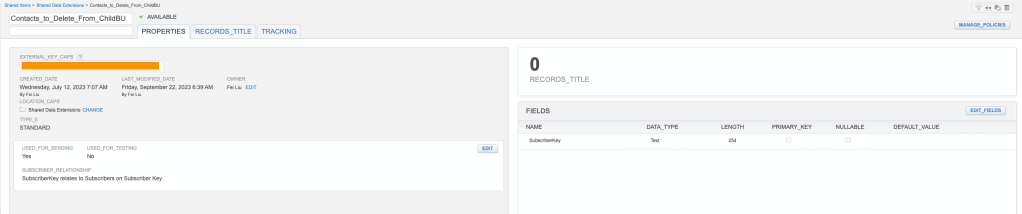
(2) Create a shared Data Extension. Only SubscriberKey is needed for the contact deletion. Make sure to create the data extension as “sendable”. Import the prepared CSV file to this shared data extension.
(3) Create a SSJS activity and use the below script for contact deletion. Provide information of the sub-domain, client credentials from the previous two steps.
<script runat="server">
Platform.Load("Core", "1");
try {
//AUTHENTICATE
var url = "https://xxx.auth.marketingcloudapis.com/v2/token";
var contentType = "application/json";
var payload = '{"grant_type": "client_credentials","client_id": "xxx","client_secret": "xxx","account_id":"xxx"}';
var accessTokenResult = HTTP.Post(url, contentType, payload);
var accessToken = Platform.Function.ParseJSON(accessTokenResult["Response"][0]).access_token;
if (accessToken != "") {
//EXECUTE
var deleteUrl = "https://xxx.rest.marketingcloudapis.com/contacts/v1/contacts/actions/delete?type=listReference";
var payload1 = '{"deleteOperationType": "ContactAndAttributes","targetList": {"listType": {"listTypeID": x},"listKey": “xxx”},”deleteListWhenCompleted": false,"deleteListContentsWhenCompleted": false}';
var headerNames = ["Authorization"];
var s1 = "Bearer ";
var headerValues = [s1.concat(accessToken)];
var result = HTTP.Post(deleteUrl, contentType, payload1, headerNames, headerValues);
}
} catch (ex) {
Write("Exception Error: " + Stringify(ex));
}
</script>
(4) Create the delete process in the child business unit and call the contact deletion SSJS script from child business unit. The below contact deletion automation is an example, and it has additional features such as: before deletion – verify if the shared data extension has contacts for deletion; after deletion – record contact deletion log; and after deletion – refresh SFMC contact count.

Some practical tips:
- Contact deletion feature needs to be enabled in the parent business unit level.
- The default suppression period is 2 days, it can be changed to 0-30 days.
- Delete up to one million records is the system limit. However, smaller amount over a period of time is considered a safer approach.
In summary, contact deletion is a continuous process. The next step is to keep monitoring the subscribers engagement level. Keep only the engaged subscribers and delete regularly the un-engaged subscribers. This normally need data support (such as 6 months engagement history). A following blog will cover this topic. Stay tuned!
Thanks for reading!

 Connected Force
Leave a comment